

Competitor Selection
Selecting the right competitors is crucial for accurate market benchmarking and strategic positioning. This step helps you understand where your practice stands in the competitive landscape and identifies opportunities for rate optimization.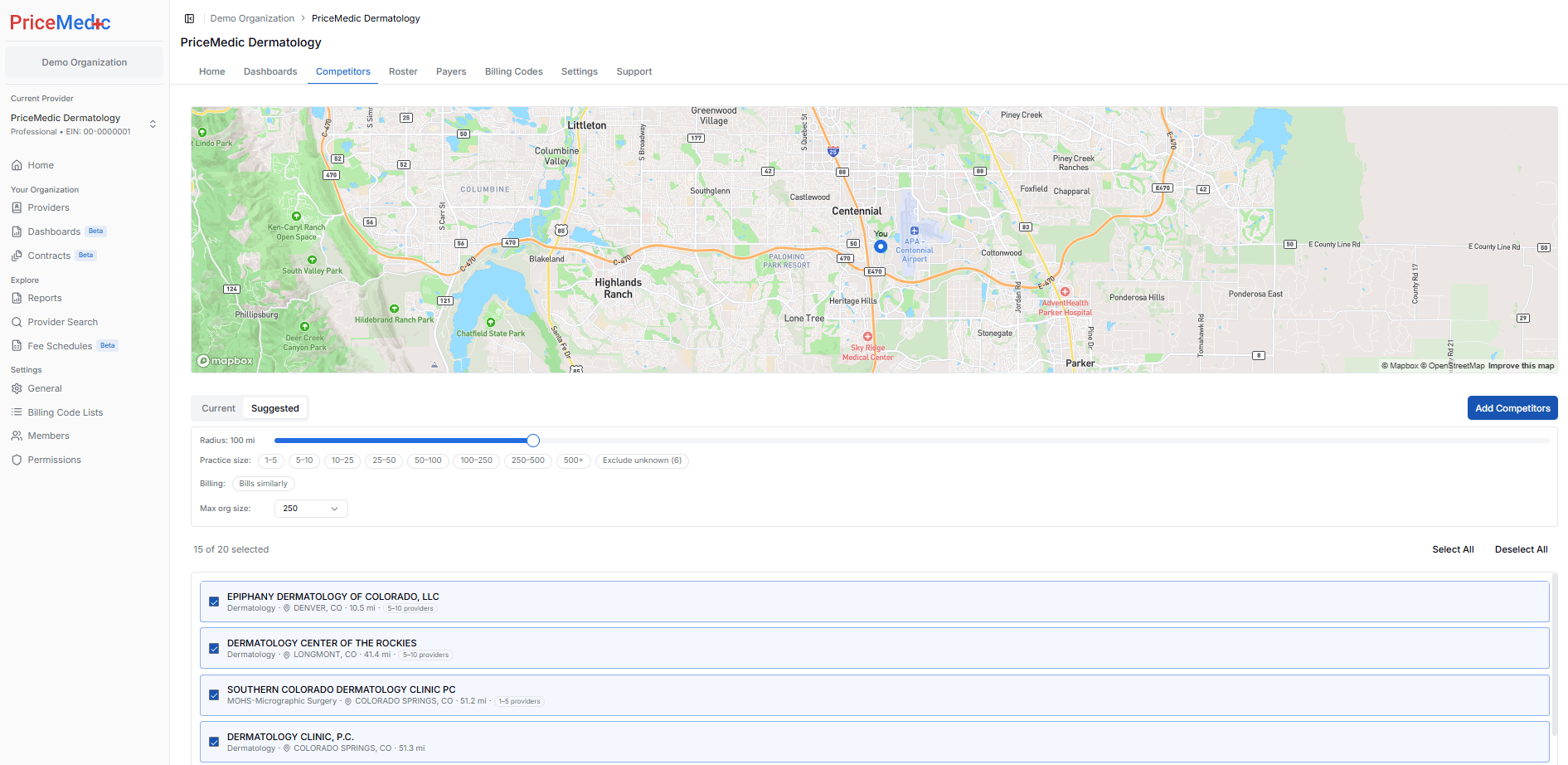
Competitor Selection Interface
The Competitors page has two toggles at the top:- Current shows the competitors already in your set.
- Suggested Competitors shows the matched candidates you can filter and pick from.
Selection Process
1
Review pre-selected competitors
Open the Suggested Competitors tab to review the providers PriceMedic has matched to your practice. Recommended competitors are already checked.
2
Adjust your selection
Check or uncheck any provider to add or remove it from your set. Changes save automatically.
3
Add competitors not in the suggested list (optional)
Use the Add Competitors button in the top right to manually search for and add organizations that aren’t in the suggested list.
Filtering Suggested Competitors
The following filters live under the Suggested Competitors tab (not Current) and let you narrow the candidate list:- Radius — slider for distance from the practice.
- Practice size — size bands from 1-5 providers up to 500+.
- Billing — select Bills similarly to keep only providers with a comparable billing profile.
- Exclude unknown — drop providers whose size or details can’t be confirmed.
- Max org size — cap the largest organizations included in the set.
Selecting Competitors
- Check or uncheck any provider to add or remove it from your set.
- Use Select All or Deselect All to bulk update your selection.
- A counter (for example, “15 of 20 selected”) shows how many competitors are currently in your set.
These selections aren’t permanent. You can return to the Competitors tab at any time to adjust your set.
Why Competitor Selection Matters
Selecting competitors that are similar enough to your practice is crucial for meaningful rate comparisons and accurate market analysis:- Comparable Practice Characteristics - Only competitors with similar size, specialty focus, and geographic presence provide relevant rate benchmarks
- Valid Rate Comparisons - Comparing rates with dissimilar organizations can lead to misleading conclusions about your market position
- Accurate Market Intelligence - Similar competitors face the same payer dynamics, patient populations, and operational challenges as your practice
- Realistic Benchmarking - Rate differences between truly comparable practices reflect genuine competitive advantages or gaps rather than structural differences
Next Steps After Competitor Selection
Once your competitor set is in place:- Data Collection - PriceMedic gathers rate transparency data for your selected competitors
- Profile Completion - Your provider profile setup is complete
- Initial Analysis - Generate your first competitive benchmark reports
- Ongoing Management - Revisit the Competitors tab to update your set as your market changes
Profile Setup Complete
Learn how to use your completed provider profile for market analysis
Need Help?
Support Documentation
Access detailed documentation and FAQs
Contact Support
Get personalized assistance with competitor selection