> ## Documentation Index
> Fetch the complete documentation index at: https://docs.pricemedic.com/llms.txt
> Use this file to discover all available pages before exploring further.
# Specialty Selection
> Add medical specialties for which you will view reimbursements
 ## Basics
Medical specialties are categorized according to the **Health Care Provider Level II (Classification)** and **Level III (Area of Specialization)** Taxonomies created and maintained by the National Uniform Claim Committee.
A complete list of medical taxonomy codes can be viewed at [taxonomy.nucc.org](https://taxonomy.nucc.org/).
PriceMedic catalogs providers according to the **Primary Taxonomy** they have self-selected for their registration needed to obtain their National Provider Identifier (NPI) number. All National Provider Identifier numbers are public and can be searched at [npiregistry.cms.hhs.gov](https://npiregistry.cms.hhs.gov/search).
If your goal is to look up the rate of a specific provider, you can search them by name in PriceMedic Provider Search to identify their specific taxonomy code to be certain they will be included in the final report.
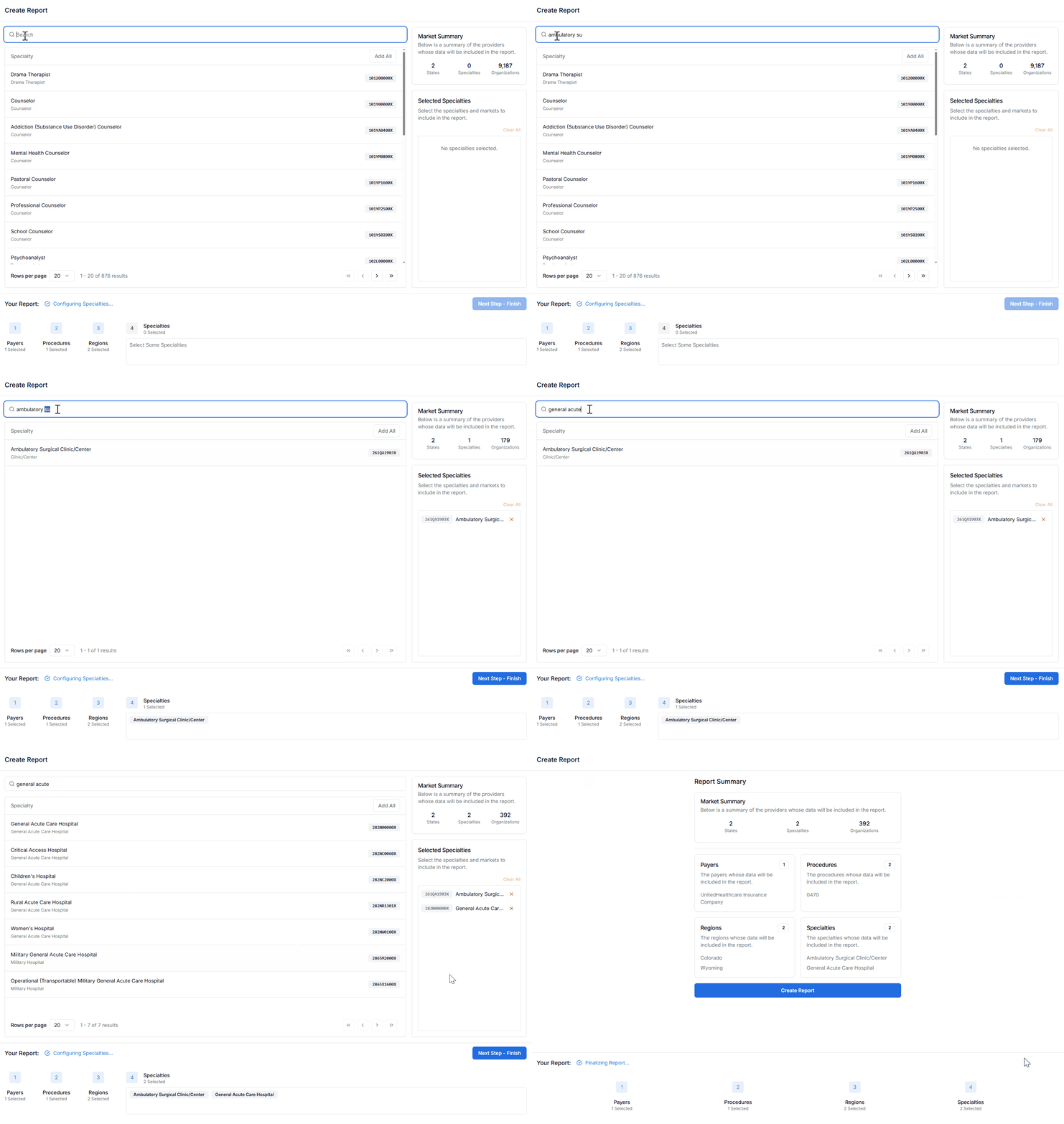
The specialty search bar can perform lookups by keyword or by alphanumeric taxonomy codes.
Medical specialties can become very granular, but oftentimes providers perform a broader set of services than their specific subspecialty taxonomy or even practice name would suggest. For this reason, it is often the best choice to begin your search by including all of the taxonomy combinations associated with the Level II Taxonomy classification you are interested in.
**Example**: If you are searching for the reimbursements of a service likely to be performed by a dermatologist, it is best to cast a broad net and select the taxonomy for:
* General Dermatology
* Dermatology, Mohs Surgery
* Dermatology, Dermatopathology
* Dermatology, Procedural Dermatology
* And other dermatology subspecialties
If you know a very particular medical specialty or credential is required to perform the billing code of interest, it may make sense to select a narrower set of specialties.
Select medical specialties by clicking on its row or **Add All** to include all the specialties currently visible in the search table. **Selected Specialties** are displayed in the right hand column. You can remove a Specialty by clicking the ❌ or **Clear All** within the Selected Specialties Section along the right hand side.
The **Market Summary Section** in the upper right hand corner will update to reflect the count of organizations of the Selected Specialties contracted with the Selected Payers in the Selected Regions.
Select **Next Step - Finish** to proceed.
## Understanding Taxonomy Codes
### Level II Classifications (Major Categories)
Common Level II taxonomy classifications include:
| Classification | Description |
| --------------------------------------- | ----------------------------------------------- |
| **Allopathic & Osteopathic Physicians** | MDs and DOs across all specialties |
| **Dental Providers** | Dentists and dental specialists |
| **Behavioral Health Providers** | Mental health and substance abuse professionals |
| **Eye and Vision Services** | Ophthalmologists and optometrists |
| **Nursing Service Providers** | Registered nurses and nurse practitioners |
| **Pharmacy Service Providers** | Pharmacists and pharmacy technicians |
### Level III Specializations
Level III codes provide more specific subspecialty information within each Level II classification.
## Tips & Tricks
Reimbursement rates published in the Transparency in Coverage data are not volume adjusted — meaning that many providers have reimbursement rates actively listed for codes they may not reasonably or frequently bill.
Careful consideration when selecting the specialties to be included in your report is the best way of ensuring you're viewing a reasonable picture of the reimbursement market for the billing code of interest.
Providers do not always select the taxonomy code that best describes their provider composition and services. If you cannot find the specific provider you are looking for, not including the specific taxonomy of the NPI they have credentialed with is the most likely culprit.
**Solution**: Use PriceMedic Provider Search to identify the exact taxonomy code for specific providers.
* **Broad approach**: Include all related subspecialties for comprehensive coverage
* **Targeted approach**: Select specific subspecialties when you need precise credential requirements
* **Hybrid approach**: Start broad and refine based on initial results
## Common Specialty Groups
* Family Medicine
* Internal Medicine
* Pediatrics
* General Practice
* General Surgery
* Orthopedic Surgery
* Cardiovascular Surgery
* Neurosurgery
* Plastic Surgery
* Cardiology
* Gastroenterology
* Endocrinology
* Pulmonology
* Oncology
* Radiology
* Pathology
* Laboratory Medicine
* Nuclear Medicine
## Next Steps
After selecting your medical specialties, proceed to [Report Summary](/guides/report-creation/05-report-summary) to review your selections and generate your final report.
## Basics
Medical specialties are categorized according to the **Health Care Provider Level II (Classification)** and **Level III (Area of Specialization)** Taxonomies created and maintained by the National Uniform Claim Committee.
A complete list of medical taxonomy codes can be viewed at [taxonomy.nucc.org](https://taxonomy.nucc.org/).
PriceMedic catalogs providers according to the **Primary Taxonomy** they have self-selected for their registration needed to obtain their National Provider Identifier (NPI) number. All National Provider Identifier numbers are public and can be searched at [npiregistry.cms.hhs.gov](https://npiregistry.cms.hhs.gov/search).
If your goal is to look up the rate of a specific provider, you can search them by name in PriceMedic Provider Search to identify their specific taxonomy code to be certain they will be included in the final report.
The specialty search bar can perform lookups by keyword or by alphanumeric taxonomy codes.
Medical specialties can become very granular, but oftentimes providers perform a broader set of services than their specific subspecialty taxonomy or even practice name would suggest. For this reason, it is often the best choice to begin your search by including all of the taxonomy combinations associated with the Level II Taxonomy classification you are interested in.
**Example**: If you are searching for the reimbursements of a service likely to be performed by a dermatologist, it is best to cast a broad net and select the taxonomy for:
* General Dermatology
* Dermatology, Mohs Surgery
* Dermatology, Dermatopathology
* Dermatology, Procedural Dermatology
* And other dermatology subspecialties
If you know a very particular medical specialty or credential is required to perform the billing code of interest, it may make sense to select a narrower set of specialties.
Select medical specialties by clicking on its row or **Add All** to include all the specialties currently visible in the search table. **Selected Specialties** are displayed in the right hand column. You can remove a Specialty by clicking the ❌ or **Clear All** within the Selected Specialties Section along the right hand side.
The **Market Summary Section** in the upper right hand corner will update to reflect the count of organizations of the Selected Specialties contracted with the Selected Payers in the Selected Regions.
Select **Next Step - Finish** to proceed.
## Understanding Taxonomy Codes
### Level II Classifications (Major Categories)
Common Level II taxonomy classifications include:
| Classification | Description |
| --------------------------------------- | ----------------------------------------------- |
| **Allopathic & Osteopathic Physicians** | MDs and DOs across all specialties |
| **Dental Providers** | Dentists and dental specialists |
| **Behavioral Health Providers** | Mental health and substance abuse professionals |
| **Eye and Vision Services** | Ophthalmologists and optometrists |
| **Nursing Service Providers** | Registered nurses and nurse practitioners |
| **Pharmacy Service Providers** | Pharmacists and pharmacy technicians |
### Level III Specializations
Level III codes provide more specific subspecialty information within each Level II classification.
## Tips & Tricks
Reimbursement rates published in the Transparency in Coverage data are not volume adjusted — meaning that many providers have reimbursement rates actively listed for codes they may not reasonably or frequently bill.
Careful consideration when selecting the specialties to be included in your report is the best way of ensuring you're viewing a reasonable picture of the reimbursement market for the billing code of interest.
Providers do not always select the taxonomy code that best describes their provider composition and services. If you cannot find the specific provider you are looking for, not including the specific taxonomy of the NPI they have credentialed with is the most likely culprit.
**Solution**: Use PriceMedic Provider Search to identify the exact taxonomy code for specific providers.
* **Broad approach**: Include all related subspecialties for comprehensive coverage
* **Targeted approach**: Select specific subspecialties when you need precise credential requirements
* **Hybrid approach**: Start broad and refine based on initial results
## Common Specialty Groups
* Family Medicine
* Internal Medicine
* Pediatrics
* General Practice
* General Surgery
* Orthopedic Surgery
* Cardiovascular Surgery
* Neurosurgery
* Plastic Surgery
* Cardiology
* Gastroenterology
* Endocrinology
* Pulmonology
* Oncology
* Radiology
* Pathology
* Laboratory Medicine
* Nuclear Medicine
## Next Steps
After selecting your medical specialties, proceed to [Report Summary](/guides/report-creation/05-report-summary) to review your selections and generate your final report.