> ## Documentation Index
> Fetch the complete documentation index at: https://docs.pricemedic.com/llms.txt
> Use this file to discover all available pages before exploring further.
# Region Selection
> Select the regions to be included in the report
 ## Basics
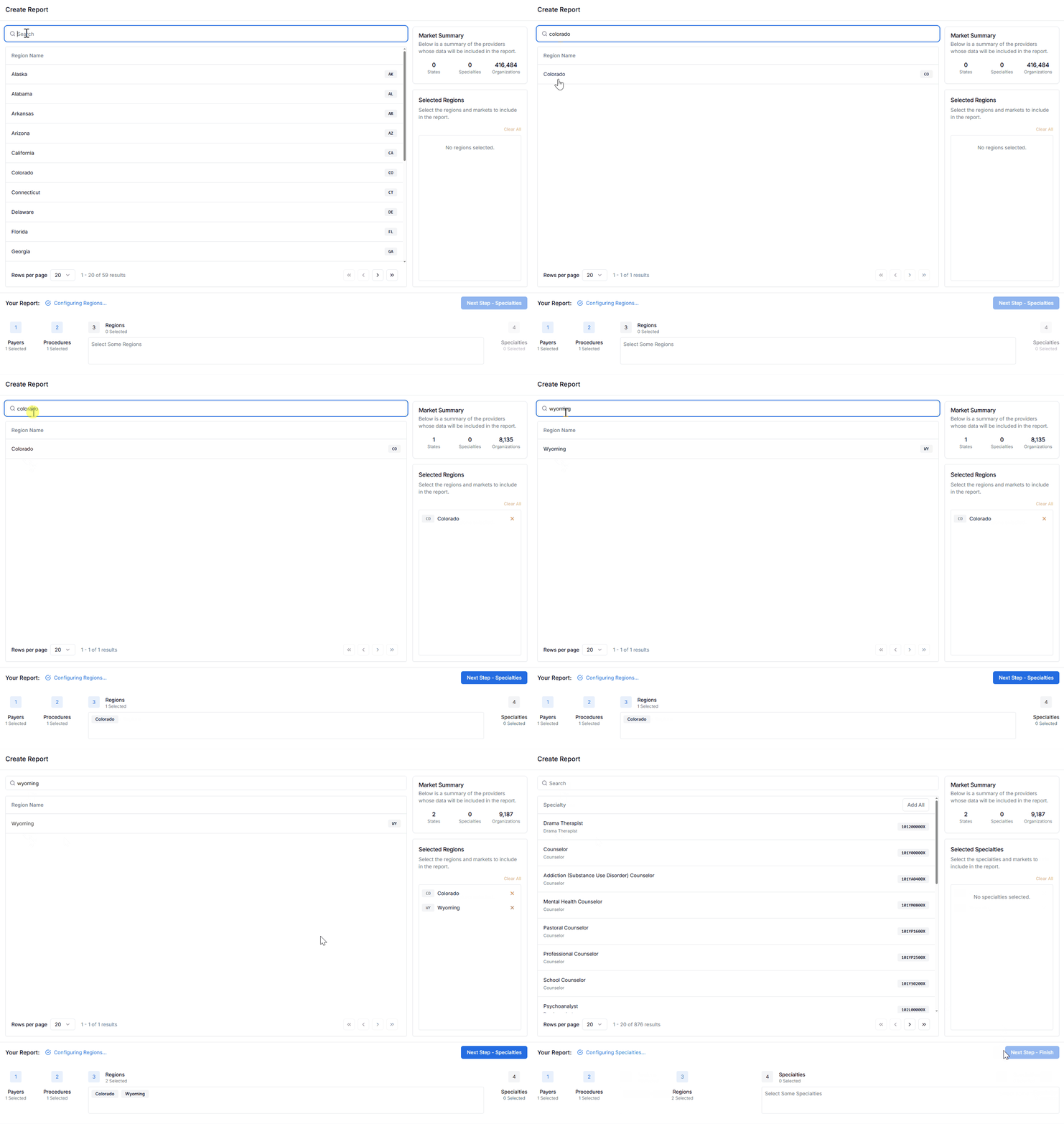
Use the search bar, scroll, and paginate functions to find the state or territory of interest. If you want to view reimbursements for all US States, select **National**.
Add a region by clicking on its row in the table. **Selected Regions** are displayed in the right hand column. You can remove a region by clicking the ❌ or **Clear All** within the Selected Regions Section along the right hand side.
The **Market Summary Section** in the upper right hand corner will update to reflect the count of organizations contracted with the Selected Payers in the Selected Regions.
The Market Summary provides valuable insight into the scope of your analysis. Use this information to ensure you have sufficient data for meaningful insights while maintaining report performance.
## Geographic Scope Options
### National Analysis
* Select **National** for a comprehensive view across all US states and territories
* Ideal for understanding broad market trends and national pricing patterns
* Best suited for large-scale market research and competitive analysis
### State-Specific Analysis
* Choose individual states for focused regional insights
* Useful for understanding local market dynamics
* Recommended when analyzing specific service areas or market penetration
### Multi-State Analysis
* Select multiple states to compare regional variations
* Effective for understanding geographic pricing differences
* Helpful for multi-location healthcare organizations
## Considerations
Not all payers have equal coverage across all regions. The Market Summary will show you the actual number of contracted organizations available for your selected combination of payers and regions.
Consider the size of your target market when selecting regions. Very small markets may not provide statistically significant insights, while very large markets may affect report performance.
Keep in mind that different states may have varying healthcare regulations and market dynamics that could influence reimbursement patterns.
Select **Next Step - Specialties** to proceed.
## Next Steps
After selecting your geographic regions, continue to [Specialty Selection](/guides/report-creation/04-specialty-selection) to define the medical specialties for your analysis.
## Basics
Use the search bar, scroll, and paginate functions to find the state or territory of interest. If you want to view reimbursements for all US States, select **National**.
Add a region by clicking on its row in the table. **Selected Regions** are displayed in the right hand column. You can remove a region by clicking the ❌ or **Clear All** within the Selected Regions Section along the right hand side.
The **Market Summary Section** in the upper right hand corner will update to reflect the count of organizations contracted with the Selected Payers in the Selected Regions.
The Market Summary provides valuable insight into the scope of your analysis. Use this information to ensure you have sufficient data for meaningful insights while maintaining report performance.
## Geographic Scope Options
### National Analysis
* Select **National** for a comprehensive view across all US states and territories
* Ideal for understanding broad market trends and national pricing patterns
* Best suited for large-scale market research and competitive analysis
### State-Specific Analysis
* Choose individual states for focused regional insights
* Useful for understanding local market dynamics
* Recommended when analyzing specific service areas or market penetration
### Multi-State Analysis
* Select multiple states to compare regional variations
* Effective for understanding geographic pricing differences
* Helpful for multi-location healthcare organizations
## Considerations
Not all payers have equal coverage across all regions. The Market Summary will show you the actual number of contracted organizations available for your selected combination of payers and regions.
Consider the size of your target market when selecting regions. Very small markets may not provide statistically significant insights, while very large markets may affect report performance.
Keep in mind that different states may have varying healthcare regulations and market dynamics that could influence reimbursement patterns.
Select **Next Step - Specialties** to proceed.
## Next Steps
After selecting your geographic regions, continue to [Specialty Selection](/guides/report-creation/04-specialty-selection) to define the medical specialties for your analysis.